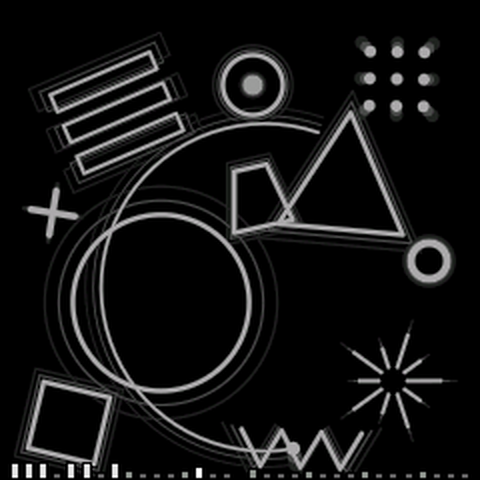
h1 turns the FM-1 into fourteen instruments that feel simple but are deceptively complex. Each instrument sets the stage with a unique themed graphic that shifts and moves with everything you do: play a note for reactions, turn a knob and it changes shape. Explore. There's a lot in here.
PRESETS picks the instrument. ALGORITHM picks one of its eight algorithms. We keep it simple with the four knobs working the live modulations for the instrument.
Deeper settings live on small, consistent, nicely designed pages that make it clear what you're changing. Learn one page and you know them all.
reference 02
on the FM-1
PRESETS
Next or previous instrument.
ALGORITHM
The instrument's eight algorithms. Dots under the name show which of the eight you are on.
KNOB 1234
Home: the instrument's four live modulations. On a page: its four columns, left to right.
SELECT
Home: tempo. On a page: next or previous page. Writing steps: moves the step cursor.
FXSELENVLFOGLOARPSEQ
Tap to open that settings page. The same button again, or HOME, goes back. GLO, SEQ and HOME act when you let go, so holding one does only its hold (below) and never opens the page.
EDIT
Pins the knob names and values to the top of the home screen. Writing steps: leaves a rest.
RECPLAY
The sequencer. Loop: REC records a take, PLAY stops and starts it. Step: REC turns step-write on and off, PLAY runs the pattern.
HOME
Back to the instrument. On the home screen it flashes the name again.
SAVE
Saves now. Everything saves by itself anyway.
OCT −OCT +
Octave down or up, two each way.
holds and combos
hold SEQ
Swaps the sequencer between LOOP and STEP, from anywhere, without opening the SEQ page.
hold GLO
Steps the metronome through CLICK REC, CLICK ON and CLICK OFF, without opening the GLOBAL page. A toast names the new setting.
hold REC
Clears the loop, or the step pattern.
hold HOME
Silences everything (all notes off).
hold SAVE
Resets this instrument to how it shipped.
OCT −+OCT +
Both together: back to the middle octave.
MIDI CC 20–23
The four knobs, from a controller. CC 123 is all notes off.
switching between loop and step 03
One sequencer, two ways to fill it. Loop records what you play, in real time. Step lets you place notes one step at a time.
hold SEQ
The quick way. Hold SEQ from anywhere and it swaps between LOOP and STEP. The new mode flashes up.
SEQKNOB 1
From the page. Tap SEQ to open the sequencer page and turn KNOB 1 (MODE) to LOOP or STEP.
Bars and meter are shared between the two modes. The step pattern is saved with your settings; a recorded loop is not.
loop settings 04
Tap SEQ with MODE on LOOP. Four columns, one per knob:
KNOB 1
MODE
LOOP · STEP
Which sequencer. Set it to LOOP.
KNOB 2
BARS
1 · 2 · 4 · 8
How long a take is. The loop closes by itself when it gets there.
KNOB 3
METER
4/4 · 3/4 · 5/4 · 6/8 · 7/8
Beats in a bar. The click accents follow it: 6/8 is two groups of three, 7/8 is 2 + 2 + 3.
KNOB 4
SNAP
FREE · 1/16 · 1/8
Quantize. FREE keeps your timing exactly, the others pull notes to the grid as you record.
Tempo is SELECT on the home screen, or TEMPO on the GLOBAL page. The page shows "HOLD SEQ: LOOP / STEP" under its title as a reminder.
step settings 05
Tap SEQ with MODE on STEP. Same page, the last column changes:
KNOB 1
MODE
LOOP · STEP
Set it to STEP.
KNOB 2
BARS
1 · 2 · 4 · 8
Pattern length. A pattern holds up to 64 steps, so long bars of small steps get fewer bars, and the page shows how many you really have.
KNOB 3
METER
4/4 · 3/4 · 5/4 · 6/8 · 7/8
Beats in a bar. Changes how many steps make a bar.
KNOB 4
GRID
1/8 · 1/16 · 1/32
How long one step is. SWING on the GLOBAL page shuffles 1/8 and 1/16 grids.
a step pattern playing
the notches along the bottom, enlarged
Reading the notches. Each notch is a step. Gaps split the bars, notches on a beat are taller, and a step that holds notes stands up. The step playing is brightest, and while you write, the cursor blinks under a dot.
An electric piano with tines, one with reeds, a felted upright, a tape flute and vibes, all played back off a record that's been loved a bit too much.
KNOB 1
DUST
Crackle and hiss.
KNOB 2
WOW
The record is warped.
KNOB 3
MUFFLE
A blanket over the speaker.
KNOB 4
SWAY
Tremolo, side to side.
algorithms
TINEA soft bar with a short bell on top.
REEDBarks when you dig in.
FELTDetuned partials and a hammer thump.
TAPEAn airy flute.
VIBESA bar with its fourth harmonic and a turning fan.
DUSKTwo soft triangles. Fog.
TOYBright, out of tune, short
RADIOA small speaker with hum.
ORBIT
space
Synths from a long way out: slow strings, a pulsar's ticking filter, tuned dust, radio from a dead probe, an endless riser, a hole.
KNOB 1
SWEEP
The filter.
KNOB 2
SPIN
How fast everything that turns, turns.
KNOB 3
SHIMMER
Octaves glittering on top.
KNOB 4
GRAVITY
Notes sag and fall away when you let go.
algorithms
NEBULAPitched noise.
DRIFTSlow strings.
PULSARA filter that ticks and jumps.
COMETAlways falling.
QUASARA disc falling in.
RADIOKeyed like a number station.
WARPThree saws an octave apart, always climbing.
HOLENothing, with a bright edge.
KOI
struck metal and wood
Struck metal and wood over still water. Oh, and some koi.
KNOB 1
MALLET
Soft felt to hard wood.
KNOB 2
RIPPLE
Two bars a hair apart.
KNOB 3
LINGER
How long it rings.
KNOB 4
SINK
Bends and dulls. Sinking.
algorithms
PANA handpan.
TONGUEA tongue drum.
KALIMBAA kalimba.
MARIMBAA marimba.
DROPSEach note comes up to its pitch from below.
GAMELANA gamelan bar.
BOWLA singing bowl, long.
RAINKeeps landing while you hold it, octaves up, and harder the more you play.
HAUNT
spooky ambient
Slow, cold, mostly air: a few sines drifting against each other, a wind that whistles at the note's pitch, and a lot of room. Also ghosts.
KNOB 1
FOG
The wind.
KNOB 2
DREAD
Voices pull out of tune; a shadow a semitone above.
KNOB 3
SHIVER
A tremble in level and pitch.
KNOB 4
DEPTH
An octave below, and darker.
algorithms
SEANCEPlain and spooky.
CRYPTAn octave down, detuned, hollow.
WRAITHNotes sag and waver.
STATICA radio between stations.
CHOIRVoices sliding from OO to AH.
BELLSStruck, and they toll again (when they like).
DEEPTwo octaves down.
VOIDEvery swell runs backwards. Reality is drawn towards the infinite.
TIDE
analog pad
Detuned saws through a slow filter.
KNOB 1
GLOW
Filter cutoff.
KNOB 2
HALO
Resonance.
KNOB 3
DRIFT
Detune and wander.
KNOB 4
SURGE
Slow swells of filter and level.
algorithms
MOONWarm saws with a sub.
SUNBrighter, an octave up.
ECLIPSEPulses through a band-pass.
AURORAA shimmer that grows in.
STORMNoisy and wide.
FOGBreathy and muffled.
COMETEach note swoops in from an octave up.
ABYSSAn octave down, dark. Underwater.
PIP
chiptune
An old friend of mine. Pulse waves, a stepped triangle, a little wave RAM and shift-register noise.
KNOB 1
SHAPE
Pulse width, or the algorithm's own shape.
KNOB 2
WOBBLE
Vibrato that comes in after the note starts.
KNOB 3
ZAP
A pitch sweep into each note, down or up.
KNOB 4
CRUNCH
Lower sample rate and fewer bits.
algorithms
PULSEA square wave, width on SHAPE.
STAIRSThe 16-step triangle, leaning towards a saw.
PWMThe pulse width sweeps by itself.
TRIADEvery note is a chord, played one note at a time, very fast.
LEAPAn octave blip in front of each note.
WAVE32 steps of 4-bit wave RAM, morphing through four shapes.
NOISEShift-register noise, tuned by the key.
DUOTwo pulses, detuned, then a fifth or an octave apart.
BONK
drum kit
Twelve synthesised drums, one on every note of the octave. The octave you play in tunes the kit.
KNOB 1
TUNE
Every drum up or down.
KNOB 2
DECAY
How long they ring.
KNOB 3
PUNCH
Pitch drop, click and drive.
KNOB 4
DIRT
Noise, grit and crushed samples.
algorithms
Bonk's a bit different. Each algorithm is a whole kit.
BOOMDeep, round and long.
SNAPTight and bright.
DUSTSoft and noisy.
WOODHigh, short, knocking.
TINMetallic and clangy.
TABLAHits that bend upward.
ZAPLaser drops.
JUNKClanks of filtered noise.
URCHIN
FM
FM synthesis with style: two modulators crossfading under one carrier, wired eight different ways.
KNOB 1
RATIO
Which overtones the modulator adds.
KNOB 2
DEPTH
How hard it modulates.
KNOB 3
FUZZ
Modulator feedback, towards noise.
KNOB 4
TAIL
How long the brightness, and the note, rings on.
algorithms
KEYSElectric piano.
BELLTwo carriers at clashing ratios.
BASSAn octave down, heavy modulation.
BRASSSwells and bite. Flares.
ORGANA stack of harmonics, sustained.
GLASSHigh, glassy overtones.
METALRing modulation, inharmonic.
CHAOSCarrier feedback; it never plays it straight.
TWANG
plucked strings
Real physically modelled strings, plucked with the shape a plectrum leaves.
KNOB 1
DAMP
How soon the string dies, and how dull.
KNOB 2
PICK
Where it is plucked, middle to bridge.
KNOB 3
TONE
Soft thumb to hard nail.
KNOB 4
BUZZ
The string rattles on its bridge.
algorithms
HARPLong ringing strings on a curved neck.
NYLONSoft and warm, classical guitar.
TWELVEEach note doubled an octave up, in courses of two.
SITARA buzzing bridge and a sympathetic drone.
BANJOBright and short, picked near the bridge, across a drum.
KOTOEach note is pressed sharp and settles.
BASSAn octave down, four thick strings.
BOWKeeps sounding while you hold the key. A cat's cradle.
LAVA
wavefolder bass
One oscillator through a wavefolder (drive it harder and the wave doubles back on itself, again and again), then a low-pass filter. This one is my favorite.
KNOB 1
FOLD
How many times the wave folds.
KNOB 2
HEAT
The filter opens.
KNOB 3
LEAN
The fold goes lopsided.
KNOB 4
SUB
A sine an octave down.
algorithms
MOLTENA folded sine.
ACIDA saw with a resonant squelch.
SQUAREA folded pulse (LEAN sets its width).
GROWLTwo detuned saws, a moving filter.
REEDA folded triangle, hollow and woody.
HOLLOWA sine that bends itself.
SHREDFolded twice, thin and bright.
QUAKEA filter wobble locked to the tempo.
KNOT
additive bells
Bells and pure tones built from sine partials, each dying away at its own rate.
KNOB 1
BLOOM
The upper partials.
KNOB 2
RING
How long it rings.
KNOB 3
TWIST
Partials stretch out of tune.
KNOB 4
WARP
The partials bend each other.
algorithms
PUREClean harmonic partials.
BELLChurch bell partials.
GLASSHigh, inharmonic and short.
ORGANHolds as long as you do.
GONGLow, washy, slow to bloom.
BOXA music box, tiny and bright.
CHIMETubular chimes.
VOIDAn octave down, dark and long.
INK
gliding lead
A singing lead that slides to each pitch and shakes once it gets there, like a bowed string or a whistle.
KNOB 1
SLIDE
How long a note takes to arrive.
KNOB 2
SHAKE
Vibrato.
KNOB 3
PRESS
Harder: brighter and thicker.
KNOB 4
DRY
Breath and scratch.
algorithms
BRUSHA saw lead.
REEDSquare and woody.
FLUTEBreathy sine.
ERHUNasal, bowed, through a body.
WHISTLEPure and airy.
THEREMINA sine that bends itself.
FUZZA distorted saw.
GLITCHPitch moves only in jumps.
BARD
medieval
Eight old instruments over a drone on the root and fifth: three plucked on real delay-line strings, two bowed, two reeds and a little pipe organ.
KNOB 1
DRONE
The bourdon under everything.
KNOB 2
COURSE
A second string, pipe or reed beside it.
KNOB 3
BITE
A harder quill or reed: brighter.
KNOB 4
AGE
Out of tune, breathy, dull.
algorithms
LUTEPlucked, warm and round.
HARPPlucked, long and open.
PSALTERYPlucked, bright and metallic.
GURDYA wheel turns the string, and the dog barks at the start of each note.
REBECBowed, with a vibrato that comes in late.
SHAWMA loud double reed.
BAGPIPEIt can't stop (aaaahhhggg), and it flicks grace notes between yours.
ORGANA little pipe organ.
TURBO
eighties
The eighties (or so my dad says), at dusk, at speed: polysynth saws, an FM electric piano, slap bass and synth brass, all a little warped.
KNOB 1
CHORUS
The oscillators spread apart.
KNOB 2
TAPE
Wow, flutter, a tired machine.
KNOB 3
GLARE
The filter opens.
KNOB 4
DRIVE
Pushed into the red.
algorithms
CRUISEPolysynth saws.
KEYSFM tine electric piano.
SLAPSlap bass.
BRASSSynth brass that scoops into the note.
MALLSlow, wide, half asleep.
LEADA solo lead.
ARCADEEach note repeats every 16th an octave up, fading.
NIGHTA glass bell over a soft saw.
guide for global settings 07
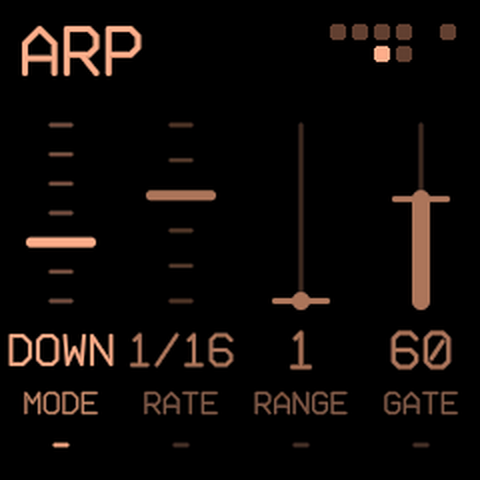
Every settings page keeps the same layout to keep it simple. Four columns, each tied to the knob under it, left to right. SELECT steps to the next page. The same button or HOME goes back.
a settings page (ARP)EDIT pins the knob strip
GLO · GLOBAL (shared by every instrument)
KNOB 1
TEMPO
40–240 BPM
Also on SELECT from the home screen.
KNOB 2
SWING
0–100
Shuffle for the arp and 1/8 or 1/16 steps.
KNOB 3
TUNE
−50 to +50
Fine tuning, in cents.
KNOB 4
BRIGHT
20–100
Screen brightness.
The metronome. Hold GLO for about half a second to step through its three settings. The page shows the current one set (as in "HOLD GLO: CLICK REC").
CLICK REC
The default. It clicks while a take is armed, recording or overdubbing.
CLICK ON
It always clicks, even with nothing playing, and through loop and step playback.
CLICK OFF
It never clicks.
The click follows METER.
SEL · KEYS (shared)
KNOB 1
ROOT
C to B
The scale's home note.
KNOB 2
SCALE
CHROM · MAJOR · MINOR · PENTA · MPENT · BLUES · DORIAN · WHOLE
Keys will snap to the set scale (bye bye music theory).
KNOB 3
GLIDE
0–100
Portamento between notes.
KNOB 4
HOLD
OFF · ON
Notes latch until your next chord. SEL stays lit while it is on.
FX (per instrument)
KNOB 1
ECHO
0–100
Echo level.
KNOB 2
TIME
1/32 to 1/2
Echo time, in tempo.
KNOB 3
SPACE
0–100
Reverb.
KNOB 4
TONE
−50 to +50
Darker or brighter.
ENV (per instrument)
KNOB 1
ATTACK
How fast a note comes in.
KNOB 2
DECAY
How fast it falls to the sustain level.
KNOB 3
SUSTAIN
The level while you hold.
KNOB 4
RELEASE
How long it lasts after you let go.
LFO (per instrument)
KNOB 1
SHAPE
SINE · TRI · RAMP · SQR · STEP · DRIFT
The wave.
KNOB 2
RATE
0–100
How fast.
KNOB 3
DEPTH
0–100
How much.
KNOB 4
TO
PITCH · K1–K4 · LEVEL · PAN
What it moves. K1–K4 show up as the instrument's own knob names.
ARP (per instrument)
KNOB 1
MODE
OFF · UP · DOWN · UPDN · RAND · ORDER · CHORD
ORDER plays notes in the order you pressed them. CHORD repeats the whole chord; walking octaves.
KNOB 2
RATE
1/4 · 1/8 · 1/8T · 1/16 · 1/16T · 1/32
Note length, in tempo.
KNOB 3
RANGE
1–4
Octaves it climbs.
KNOB 4
GATE
5–100
How long each note is held. ARP blinks on the beat while it runs.
Per-instrument settings. The four knobs and the algorithm are remembered for each instrument separately and saved by themselves a moment after you stop turning. Hold SAVE to put the instrument back to default settings.
guide for recording 08
recording a loop
1 · REC
Arms a take. REC blinks and the click starts counting straight away.
2 · play
The take starts on your first note, lined up to the start of the bar the click is in. A line grows along the bottom of the screen. With CLICK OFF there's no bar to line up to, so it'll start exactly on your first note.
3 · REC
Closes the loop and it plays back. Or let it run to BARS and it closes itself.
4 · REC
While it plays: overdub. Play over the top and it adds to the loop. REC again goes back to just playing.
PLAY
Stops and starts the loop.
hold REC
Clears it.
You can switch instruments, algorithms and knobs while a loop plays; it plays notes, so it plays whatever instrument is up. SNAP on the SEQ page will quantize as you record. Hold GLO to set the metronome (see the GLOBAL page above).
the keyboard shows the pattern
While the sequencer is running, the 16 white keys light up as a map of the pattern, left to right (same way FM-1's stock firmware does). A key is lit where its steps hold notes, and the step that's playing flips its key (lit goes dark, dark lights), so you can watch the position run across the keyboard. The cursor's key will blink while you're writing steps.
Each key is one step for a pattern of up to 16 steps, two steps up to 32, three up to 48 and four up to 64. A loop shows the same way, counted in sixteenths: a 2-bar loop in 4/4 is 32 sixteenths (so two to a key).
The map shows in STEP while the pattern plays, while you write, or with the SEQ page open. In LOOP it shows while you record, play or overdub, or with the SEQ page open while stopped. The rest of the time the keys light up for the notes that are sounding.
writing steps
1 · hold SEQ
Switch to STEP (if it is not already).
2 · REC
Step-write on. REC stays lit and the cursor blinks under the step it will write.
3 · a key or chord
Lands on the blinking step. Up to four notes per step.
EDIT
Leaves a rest and moves on.
SELECT
Moves the cursor back or forward, to fix a step.
PLAY
Runs the pattern. With write still on, whatever you play lands on the step going by. Yay live step recording!
REC
Step-write off.
hold REC
Clears the pattern.
Step-write works from the home screen. The step pattern saves with your settings, so it'll still be there after you turn the FM-1 off and on (loops are never saved).
faqs 09
Can I put it on my FM-1 yet?
Yep. The first public release is live on GitHub, and I'm working on getting it circulated to places like The Firmware Hub. You can also play it in my FM-1 browser sim.
How will I install it?
I recommend The Firmware Hub, in Chrome or Edge. Back up first: whatever the firmware you are leaving has saved (presets, projects, samples) may be gone or unreadable afterwards, so save it with that firmware's own backup. Charge the FM-1 and use a USB cable that carries data.
1. If the FM-1 runs something older than stock V15, update it to V15 with M-VAVE's updater. 2. Connect it over USB, open thefirmwarehub.com, press Connect FM-1 and allow MIDI. 3. Press Install on h1. It takes about a minute. Keep the cable in until the FM-1 restarts into h1.
There's also a command-line installer in the repo. h1 is community firmware with no warranty and nothing to do with M-VAVE. Install at your own risk! (Though, it's pretty solid)
How do I leave h1 again?
h1's package carries an update loader, so the same installers can replace it. For another custom firmware, press Install on its card at The Firmware Hub, or use that firmware's own installer. To go back to stock, press Back to official V15 in the Hub's Official firmware box. h1 only saves its own settings, so leaving it doesn't bring back what an earlier firmware had saved. That's what the backup is for.
What if an install goes wrong?
If an install stops halfway, plug the FM-1 back in and press Install again, and the loader picks up where it stopped. If h1 fails to start twice, it comes up in SAFE MODE: no sound, but USB works, so the Hub can install h1 again, another firmware or V15. If nothing reaches it at all, hold REC while you switch it on. That's the chip's own update mode, and the Hub's rescue page takes it from there. The chip's bootloader is in ROM and can't be overwritten.
Does it work on every FM-1?
It's built to. Newer units use a different flash chip (0xB36014 instead of 0x856014), and h1 recognises both, so saves and updates work on either.
Why does nothing happen when I turn a knob on a settings page and then go home?
The knobs do different jobs in different places: on the home screen they are always the instrument's four modulations, on a page they set that page's four columns. Hit HOME or the page's button to go back to playing.
A note is stuck. How do I stop it?
Hold HOME. Everything goes silent. If HOLD is on (SEL lights), turn it off on the KEYS page or play a new chord to replace what is held.
Is my loop saved when I power off?
No. The step pattern, every instrument's knobs, algorithm and settings are saved. A recorded loop lives only until you clear it (or power off).
Why does the ALGORITHM knob change the picture so much?
On purpose. Each algorithm is a different character for the instrument, so the picture changes with it: TIDE's sky swaps a moon for a sun or a storm, BONK re-hangs its whole composition, TWANG's strings become a harp, a banjo or a cat's cradle. If you don't like it... sorry? There's plenty of other firmwares.
Can I play it from a MIDI keyboard?
Yes. Notes in over USB or the TRS MIDI port play it, CC 20 to 23 turn the four knobs, and CC 123 stops everything. There's no MIDI out, no Bluetooth MIDI and no USB audio.
Does it work with a screen reader?
Yes. With fm1-reader, a screen reader hears the instrument, the algorithm, the page and every control's value even as you change it.
Does the simulator sound like the device?
It runs the same code, so the synthesis and the pictures match as best as I can make them. But it's not running on the FM-1's speaker obviously, or its processor time and the feel of the clicking encoders. The ‹ › buttons beside each slider send single clicks, the way the real encoders step. It lives in its own repo, fm1-browser-simulator (and can run other FM-1 firmwares, too!).
Is it open source?
The code is public at github.com/jakehandy/h1. It's MIT licensed, and builds on fm1-base (MPL-2.0). Its package identity is FM-1_481, and a release X.Y.Z answers FM-1_481XXYYZZ.